Priyo Mail email forwarding makes it easy to manage multiple email accounts from one inbox. Whether you’re a freelancer, small business owner, or busy professional, this feature helps streamline communication, reduce clutter, and stay organized—without missing a single important message.
Key Takeaways
- Effortless Email Management: Priyo Mail email forwarding lets you receive emails from multiple accounts in one place, saving time and reducing inbox overload.
- Easy Setup Process: Setting up forwarding takes just a few clicks, with clear instructions and no technical expertise required.
- Enhanced Productivity: By centralizing your emails, you can respond faster and stay on top of urgent messages across platforms.
- Secure and Reliable: Priyo Mail uses encryption and secure protocols to protect your forwarded emails from unauthorized access.
- Customizable Rules: You can set filters and conditions to forward only specific emails, keeping your main inbox clean and focused.
- Ideal for Teams and Individuals: Whether you’re managing personal accounts or coordinating with a team, forwarding ensures everyone stays in the loop.
- Cost-Effective Solution: Avoid paying for multiple premium email services by using forwarding to consolidate your communication needs.
📑 Table of Contents
- What Is Priyo Mail Email Forwarding?
- Why Use Email Forwarding with Priyo Mail?
- How to Set Up Priyo Mail Email Forwarding
- Customizing Your Forwarding Rules
- Real-Life Use Cases for Priyo Mail Email Forwarding
- Tips for Getting the Most Out of Email Forwarding
- Common Challenges and How to Solve Them
- Conclusion
What Is Priyo Mail Email Forwarding?
Imagine having three email accounts—one for work, one for personal use, and another for your side hustle. Checking each one separately every day sounds exhausting, right? That’s where Priyo Mail email forwarding comes in. It’s a smart feature that automatically sends incoming emails from one account to another, so you only need to check one inbox.
Priyo Mail is a modern email service designed with simplicity and efficiency in mind. While it offers a clean interface and strong security, one of its standout features is email forwarding. This function allows users to redirect messages from external email providers—like Gmail, Yahoo, or Outlook—directly into their Priyo Mail inbox. No more switching tabs or missing important updates because you forgot to check another account.
Whether you’re juggling multiple roles or just want to simplify your digital life, Priyo Mail email forwarding acts like a personal assistant for your inbox. It quietly collects all your messages and delivers them to a single, organized location. Think of it as a mailroom for your digital communications—efficient, reliable, and always on duty.
Why Use Email Forwarding with Priyo Mail?
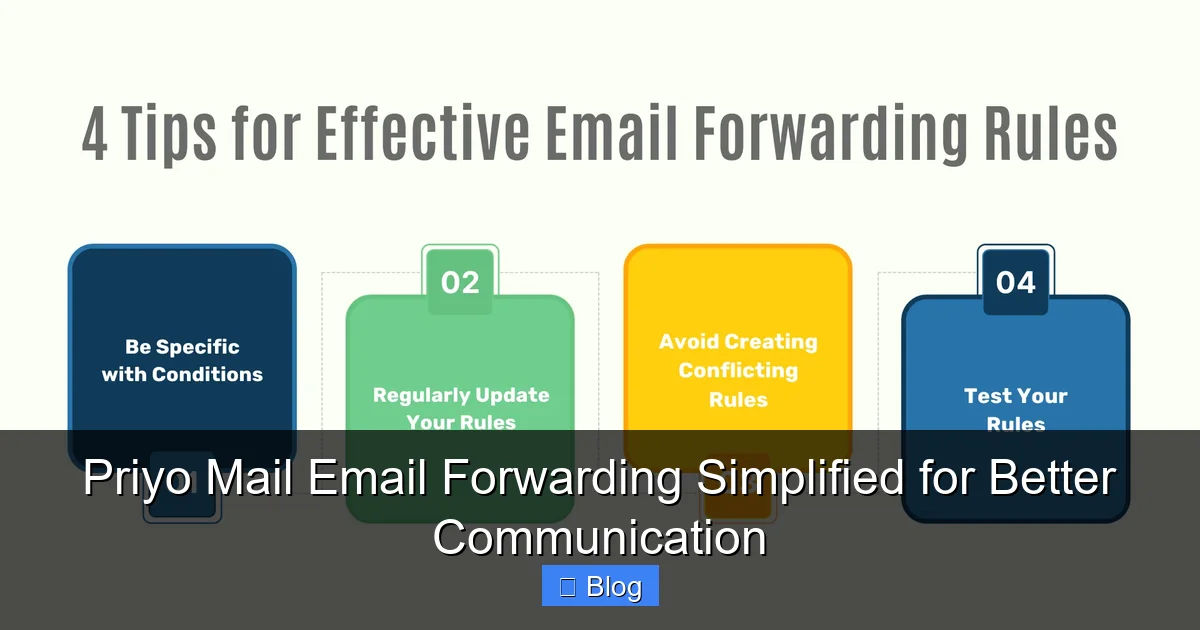
Visual guide about Priyo Mail Email Forwarding Simplified for Better Communication
Image source: hityourmark.io
Let’s be honest—most of us are drowning in email. Between newsletters, client inquiries, family updates, and promotional offers, it’s easy to feel overwhelmed. Priyo Mail email forwarding helps cut through the noise by bringing everything together.
One of the biggest advantages is time savings. Instead of logging into five different accounts every morning, you open Priyo Mail and see it all in one place. This means fewer distractions, fewer missed messages, and more focus on what really matters.
Another major benefit is consistency. When all your emails arrive in one inbox, it’s easier to maintain a professional presence. For example, if you run a small business and use different emails for sales, support, and partnerships, forwarding them all to Priyo Mail ensures you never miss a customer request—even if it lands in an account you don’t check daily.
Improved Organization and Focus
With forwarding, you can create a system that works for you. Maybe you want all client emails to go to your Priyo Mail inbox, while newsletters go to a separate folder. Or perhaps you only forward urgent messages during work hours. Priyo Mail lets you customize these rules so your inbox stays clean and relevant.
This level of control is especially helpful for freelancers and remote workers. If you’re managing projects across platforms like Upwork, Fiverr, or LinkedIn, forwarding those messages to one place means you can respond quickly and professionally—without the hassle of juggling logins.
Better Security and Privacy
You might wonder: is forwarding emails safe? With Priyo Mail, the answer is yes. The platform uses end-to-end encryption and secure SMTP/IMAP protocols to protect your data during transit. That means your emails are shielded from hackers and prying eyes as they move from one server to another.
Plus, since you’re reducing the number of accounts you actively use, you’re also lowering your digital footprint. Fewer logins mean fewer opportunities for phishing attacks or password breaches. It’s a simple but effective way to boost your online security.
How to Set Up Priyo Mail Email Forwarding
Setting up Priyo Mail email forwarding is surprisingly simple—even if you’re not tech-savvy. The process involves just a few steps, and you can have it running in under 10 minutes.
Step 1: Log Into Your Source Email Account
Start by signing into the email account you want to forward from—say, your Gmail or Yahoo account. Look for settings related to “Forwarding” or “Mail Forwarding.” This is usually found under “Settings” > “See all settings” > “Forwarding and POP/IMAP.”
Step 2: Add Your Priyo Mail Address
In the forwarding section, you’ll see an option to add a forwarding address. Enter your full Priyo Mail email address (e.g., [email protected]). The system will send a confirmation email to that address to verify it’s valid.
Step 3: Confirm the Forwarding Request
Go to your Priyo Mail inbox and open the confirmation email. Click the verification link inside. This tells the original email provider that you approve the forwarding setup.
Step 4: Choose Forwarding Options
Now you can decide what happens to the original emails. You can choose to:
- Keep a copy in the original inbox
- Delete the original after forwarding
- Forward only specific emails using filters
For most users, keeping a copy is the safest option—just in case something goes wrong during the transfer.
Step 5: Test the Setup
Send a test email to your original account and check if it appears in your Priyo Mail inbox. If it does, congratulations—you’ve successfully set up Priyo Mail email forwarding!
Customizing Your Forwarding Rules
One of the best things about Priyo Mail email forwarding is how flexible it is. You’re not stuck with a one-size-fits-all solution. Instead, you can tailor the forwarding to match your lifestyle and workflow.
Filtering by Sender or Subject
Let’s say you only want emails from your boss or clients to be forwarded. In your original email settings, you can create a filter that checks the “From” field. If the sender matches a specific address, the email gets forwarded. Otherwise, it stays in the original inbox.
You can also filter by subject line. For example, emails with “URGENT” or “Invoice” in the subject could be automatically sent to Priyo Mail, while promotional emails are left behind.
Time-Based Forwarding
Some email providers allow you to set time-based rules. While Priyo Mail itself doesn’t control this directly, you can use your source email’s settings to forward messages only during business hours. This is great if you want to avoid work emails piling up in your personal inbox after 6 PM.
Forwarding to Multiple Addresses
Need to keep your team in the loop? You can set up forwarding to send emails to more than one Priyo Mail address. For instance, customer support inquiries could go to both you and your assistant. Just make sure everyone knows the system is in place to avoid duplicate responses.
Real-Life Use Cases for Priyo Mail Email Forwarding
Priyo Mail email forwarding isn’t just a cool feature—it’s a practical tool that real people use every day. Here are a few scenarios where it makes a big difference.
Freelancers and Solopreneurs
Sarah is a graphic designer who uses Gmail for client communication, Outlook for invoices, and a personal Yahoo account for family updates. By setting up Priyo Mail email forwarding, she now checks one inbox for everything. She’s reduced her email-checking time by 60% and hasn’t missed a deadline since.
Small Business Owners
Mike runs a local coffee shop and uses different emails for suppliers, staff, and marketing. With forwarding, all operational emails land in his Priyo Mail inbox. He’s even set up filters so supplier orders go to his manager, while marketing emails go to his social media coordinator. It’s like having a virtual assistant without the payroll.
Remote Workers and Digital Nomads
Jenna travels frequently and relies on public Wi-Fi. By centralizing her emails in Priyo Mail, she only needs to log in once per day—no matter where she is. Plus, the secure forwarding gives her peace of mind that her work communications are protected.
Students and Academics
College students often have university emails, personal accounts, and internship contacts. Forwarding all academic and job-related emails to Priyo Mail helps them stay organized during busy semesters. No more missing an important deadline because an email got buried in a cluttered inbox.
Tips for Getting the Most Out of Email Forwarding
To make the most of Priyo Mail email forwarding, keep these best practices in mind.
Use Descriptive Labels
When setting up filters, use clear labels like “Work – Client Emails” or “Personal – Family.” This makes it easier to manage rules later and helps you quickly identify where an email came from.
Regularly Review Your Rules
Email habits change. What worked six months ago might not work today. Set a reminder every few months to review your forwarding rules and update them as needed.
Combine with Priyo Mail’s Other Features
Priyo Mail isn’t just about forwarding. Use its built-in tools like folders, search, and priority inbox to further organize your messages. For example, create a “High Priority” folder for forwarded emails from key clients.
Monitor for Duplicates
Sometimes, forwarding can cause duplicate emails—especially if you’re using multiple services. Keep an eye out and adjust your settings if you notice repeats.
Backup Important Emails
While forwarding is reliable, it’s always smart to back up critical messages. Use Priyo Mail’s export feature or save important emails to cloud storage like Google Drive or Dropbox.
Common Challenges and How to Solve Them
Even the best tools can have hiccups. Here’s how to handle common issues with Priyo Mail email forwarding.
Emails Not Forwarding
If emails aren’t showing up, double-check your forwarding settings. Make sure the confirmation email was clicked and that the forwarding address is correct. Also, verify that your source email isn’t blocking external forwarding.
Spam or Unwanted Emails
Forwarding can sometimes bring in spam. Use Priyo Mail’s spam filter and mark unwanted messages as junk. You can also adjust your source email’s filters to block known spam senders before they’re forwarded.
Slow Delivery
Occasionally, forwarded emails may arrive with a slight delay. This is normal and usually due to server processing times. If delays are frequent, contact your email provider’s support team.
Privacy Concerns
Some users worry that forwarding exposes their emails to third parties. Rest assured, Priyo Mail does not scan or store your forwarded content for advertising purposes. Your privacy is a top priority.
Conclusion
Priyo Mail email forwarding is more than just a convenience—it’s a game-changer for anyone who values efficiency, security, and simplicity. By consolidating your emails into one inbox, you save time, reduce stress, and stay in control of your communication.
Whether you’re a busy professional, a growing business, or someone who just wants a cleaner digital life, this feature offers real value. The setup is quick, the customization options are powerful, and the benefits are immediate.
So why keep juggling multiple accounts when you can have one smart inbox do the work for you? Try Priyo Mail email forwarding today and experience the difference it makes in your daily routine.
Frequently Asked Questions
How does Priyo Mail email forwarding work?
Priyo Mail email forwarding automatically sends incoming emails from other accounts (like Gmail or Yahoo) to your Priyo Mail inbox. You set it up in your original email’s settings, and once confirmed, all messages are redirected seamlessly.
Is email forwarding secure with Priyo Mail?
Yes, Priyo Mail uses encryption and secure protocols to protect your emails during forwarding. Your data is not scanned or stored for advertising, ensuring privacy and security.
Can I forward emails from multiple accounts to one Priyo Mail inbox?
Absolutely. You can set up forwarding from as many email accounts as you need. Just repeat the setup process for each account and customize rules as desired.
Will forwarding delete my original emails?
It depends on your settings. You can choose to keep a copy in the original inbox, delete it after forwarding, or apply filters. Most users prefer to keep a backup for safety.
Can I stop forwarding emails at any time?
Yes, you can disable forwarding anytime by going back to your original email’s settings and turning off the forwarding option. Your emails will stop being redirected immediately.
Does Priyo Mail charge for email forwarding?
No, Priyo Mail email forwarding is a free feature included with your account. There are no hidden fees or premium requirements to use it.
Leave a Reply