Instant Mail Priyo offers a fast, secure way to protect your personal email from spam and privacy risks. With just one click, you can generate a temporary email address that self-destructs after use—perfect for signing up for services, downloading files, or testing apps without exposing your real inbox.
In today’s digital world, your email address is more than just a login—it’s a digital fingerprint. Every time you sign up for a newsletter, download an eBook, or create an account on a new app, you’re handing over personal data that can be tracked, sold, or even leaked. And let’s be honest: most of us don’t read the fine print. We click “I agree” and hope for the best. But what if there was a smarter, safer way to interact online without sacrificing convenience?
That’s where Instant Mail Priyo temporary email comes in. It’s a clever, no-fuss tool that lets you generate a disposable email address in seconds—no sign-up, no personal details, just instant privacy. Whether you’re avoiding spam, protecting your main inbox, or testing a new service, this tool gives you control over your digital footprint. Think of it as a digital burner phone for your email: use it once, discard it, and move on.
Key Takeaways
- Instant Setup: Create a temporary email in seconds—no registration or personal info required.
- Privacy Protection: Keep your real email hidden from data-hungry websites and potential breaches.
- Spam Prevention: Use disposable addresses to avoid unwanted promotional emails and phishing attempts.
- No Downloads Needed: Access Instant Mail Priyo directly from your browser—no software or apps to install.
- Auto-Expiring Inboxes: Emails disappear after a set time, reducing long-term digital footprints.
- Ideal for Testing & Sign-Ups: Perfect for one-time registrations, free trials, or downloading gated content.
- Free and User-Friendly: Simple interface with no hidden fees—great for beginners and tech-savvy users alike.
📑 Table of Contents
- What Is Instant Mail Priyo Temporary Email?
- Why You Need a Temporary Email in 2024
- Top Use Cases for Instant Mail Priyo
- How Instant Mail Priyo Stands Out
- Step-by-Step Guide: How to Use Instant Mail Priyo
- Privacy and Security: What You Need to Know
- Common Misconceptions About Temporary Emails
- Tips for Maximizing Your Privacy
- Conclusion
What Is Instant Mail Priyo Temporary Email?
Instant Mail Priyo is a free, web-based service that generates temporary email addresses on demand. These disposable inboxes are perfect for short-term use—like signing up for a free trial, downloading a resource, or verifying an account—without exposing your primary email. Once the task is done, the inbox expires automatically, leaving no trace behind.
Unlike traditional email providers, Instant Mail Priyo doesn’t require you to create an account or provide any personal information. You simply visit the website, and a unique email address is generated instantly. You can then use this address to receive emails, which appear in a clean, easy-to-read interface. Most importantly, these emails vanish after a set period—usually between 10 minutes and 24 hours—depending on the service settings.
How It Works
Using Instant Mail Priyo is as simple as 1-2-3:
- Visit the Website: Go to the Instant Mail Priyo homepage.
- Get Your Temp Email: A random email address (like [email protected]) appears instantly.
- Use and Monitor: Copy the address, paste it wherever needed, and watch incoming messages in real time.
There’s no login, no password, and no tracking. It’s pure, unfiltered privacy.
Why “Priyo”?
The name “Priyo” means “beloved” or “dear” in several South Asian languages. It reflects the tool’s mission: to make privacy feel personal and accessible. Unlike cold, corporate alternatives, Instant Mail Priyo aims to be friendly, intuitive, and human-centered—because protecting your data shouldn’t feel like a chore.
Why You Need a Temporary Email in 2024
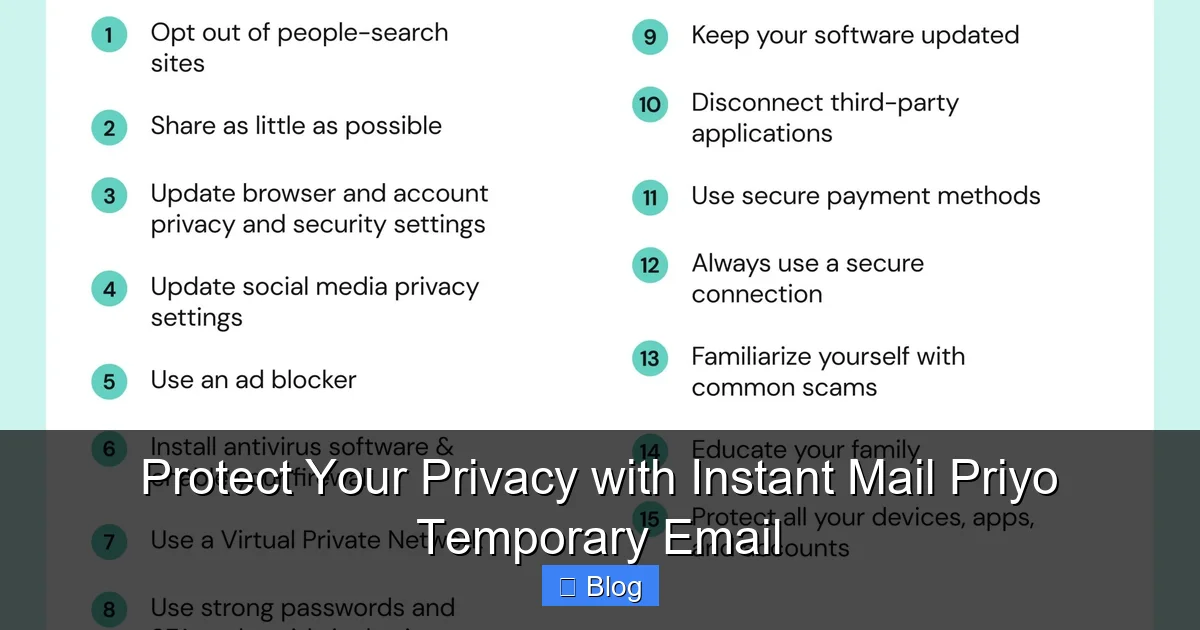
Visual guide about Protect Your Privacy with Instant Mail Priyo Temporary Email
Image source: onerep.com
Let’s face it: the internet is crowded, noisy, and often unsafe. Every click can leave a digital trail. Here’s why using a temporary email like Instant Mail Priyo is more important than ever.
The Spam Epidemic
Spam isn’t just annoying—it’s dangerous. Unwanted emails clutter your inbox, bury important messages, and often contain phishing links or malware. According to recent reports, over 45% of all emails are spam. By using a disposable address, you keep your primary inbox clean and reduce exposure to malicious content.
Data Breaches Are Everywhere
Major companies get hacked all the time. When that happens, user data—including email addresses—gets leaked onto the dark web. If you’ve used your real email on a sketchy site, it could end up in a breach. With Instant Mail Priyo, even if a site gets compromised, your personal email stays safe.
Free Trials and Gated Content
Many websites offer free eBooks, templates, or software downloads—but only after you enter your email. Instead of giving away your real address, use a temporary one. You get the resource, and they get a disposable inbox. Win-win.
Testing and Development
If you’re a developer, marketer, or tester, you often need to create multiple accounts to test features. Instead of cluttering your personal email, use Instant Mail Priyo to simulate real users without the mess.
Top Use Cases for Instant Mail Priyo
This tool isn’t just for avoiding spam—it’s versatile and practical for everyday digital life.
1. Signing Up for Free Trials
Want to test Netflix, Spotify, or a new SaaS tool? Most free trials require an email. Use Instant Mail Priyo to sign up, enjoy the trial, and avoid follow-up emails when you cancel.
2. Downloading Digital Products
Blogs, courses, and software often gate downloads behind email forms. Instead of giving your real address, use a temporary one. You get the file, and your inbox stays private.
3. Creating Social Media Accounts
Platforms like Instagram, TikTok, or Reddit require email verification. If you’re testing a new account or managing multiple profiles, a disposable email keeps things organized and secure.
4. Job Applications and Networking
When applying for jobs or connecting on LinkedIn, you might need to share an email. Use a temporary one for initial contact, then switch to your real address once trust is established.
5. Online Forums and Communities
Joining a new forum? Use a temp email to participate without revealing your identity. If the community turns toxic, simply abandon the inbox.
6. Avoiding Marketing Overload
Some websites instantly sign you up for newsletters the moment you visit. With Instant Mail Priyo, you can browse freely without being bombarded with promotional emails later.
How Instant Mail Priyo Stands Out
Not all temporary email services are created equal. Here’s what makes Instant Mail Priyo a top choice.
No Registration Required
Unlike some competitors, Instant Mail Priyo doesn’t ask for your phone number, name, or credit card. Just visit the site and start using it. No strings attached.
Instant Generation
Your email appears in under 3 seconds. No waiting, no loading screens—just instant access.
Clean, Ad-Free Interface
Many temp email sites are cluttered with pop-ups and ads. Instant Mail Priyo keeps it simple: a clean inbox, real-time updates, and zero distractions.
Auto-Expiring Inboxes
Emails disappear after 10–60 minutes (configurable), so you’re never stuck with old messages. This reduces clutter and enhances privacy.
No Tracking or Logging
Your activity isn’t monitored, stored, or sold. Instant Mail Priyo respects your anonymity from start to finish.
Mobile-Friendly
Whether you’re on a phone, tablet, or desktop, the interface adapts seamlessly. Great for on-the-go use.
Step-by-Step Guide: How to Use Instant Mail Priyo
Ready to try it? Here’s a quick walkthrough.
Step 1: Go to the Website
Open your browser and navigate to the Instant Mail Priyo homepage.
Step 2: Copy Your Temp Email
A random address like [email protected] will appear. Click the copy button or highlight and copy it manually.
Step 3: Use It Anywhere
Paste the email into any sign-up form, download gate, or verification field.
Step 4: Monitor Incoming Messages
Return to the Instant Mail Priyo page. Any emails sent to your temp address will appear in real time. Click to read, download attachments, or forward if needed.
Step 5: Let It Expire
Once you’re done, simply close the tab. The inbox will auto-delete after the set time, leaving no trace.
Pro Tip:
Bookmark the site for quick access. You can also use browser extensions or mobile bookmarks for even faster use.
Privacy and Security: What You Need to Know
You might be wondering: Is it really safe? Can anyone see my emails?
End-to-End Privacy
Instant Mail Priyo doesn’t store your emails permanently. Messages are held temporarily and deleted automatically. There’s no database of user activity.
No Personal Data Collected
Since no registration is required, there’s no way to link your temp email to your identity. Even if someone tried to trace it, they’d hit a dead end.
HTTPS Encryption
The site uses secure HTTPS protocols, meaning your connection is encrypted. No one can snoop on your activity.
Limitations to Keep in Mind
While highly secure, temporary emails aren’t foolproof. Avoid using them for sensitive actions like banking, legal documents, or two-factor authentication on important accounts. They’re best for low-risk, short-term use.
Common Misconceptions About Temporary Emails
Let’s clear up a few myths.
“They’re Only for Spammers”
False. Legitimate users rely on temp emails for privacy, testing, and convenience. It’s a smart digital hygiene practice—not a shady tactic.
“They Don’t Work with All Sites”
Most sites accept temp emails, but some block known disposable domains. If one doesn’t work, try refreshing for a new address or use a different service.
“They’re Hard to Use”
Not with Instant Mail Priyo. It’s designed for simplicity—no learning curve required.
“They’re Not Secure”
While no system is 100% unhackable, Instant Mail Priyo uses strong privacy practices. For everyday use, it’s more than secure enough.
Tips for Maximizing Your Privacy
Make the most of your temporary email with these expert tips.
- Use Unique Addresses: Generate a new email for each site to avoid cross-tracking.
- Don’t Share Sensitive Info: Never send passwords, IDs, or financial details to a temp inbox.
- Check Expiry Times: Know how long your inbox lasts—some last only 10 minutes.
- Combine with a VPN: For extra privacy, use a VPN while accessing temp emails.
- Clear Browser Data: After use, clear cookies and cache to remove traces.
Conclusion
In a world where your email is constantly under siege, Instant Mail Priyo temporary email offers a simple, powerful solution. It’s fast, free, and fiercely private—perfect for anyone who values their digital freedom. Whether you’re dodging spam, protecting your identity, or just testing the waters online, this tool puts you in control.
Don’t let your inbox become a liability. Start using Instant Mail Priyo today and experience the peace of mind that comes with true online privacy. It’s not just smart—it’s essential.
Frequently Asked Questions
Is Instant Mail Priyo free to use?
Yes, Instant Mail Priyo is completely free. There are no hidden fees, subscriptions, or premium tiers. You can generate as many temporary emails as you need at no cost.
How long do emails stay in the inbox?
Emails typically remain in the inbox for 10 to 60 minutes, depending on the service settings. Once the time expires, the inbox and all messages are automatically deleted.
Can I send emails from a temporary address?
Most temporary email services, including Instant Mail Priyo, are receive-only. You can read and download incoming messages, but you cannot send replies or compose new emails.
Will websites block Instant Mail Priyo addresses?
Some websites block known disposable email domains to prevent abuse. If a site rejects the address, try refreshing for a new one or use a different temporary email provider.
Is it safe to use for important accounts?
No. Temporary emails should not be used for banking, government services, or two-factor authentication on critical accounts. They’re best for low-risk, short-term use only.
Can I recover emails after the inbox expires?
No. Once the inbox expires, all messages are permanently deleted and cannot be recovered. Make sure to download any important attachments before the timer runs out.
Leave a Reply